Target Mastery — KPI-driven Optimization
Inverting the logic of crew planning optimization — from parameter-first to goal-first — to eliminate the expert knowledge bottleneck and open the path for AI-assisted planning.
problem
Even after JAWS reduced analysis time by ~70%, planners still faced the same underlying problem: to get a good result from the optimizer, you had to know which of 2,000+ parameters to touch — and why. That knowledge lived in people's heads, not in the tool.
solution
A new interaction model where planners define their targets — the KPIs and ranges they want to achieve — and let the system identify which parameters are relevant, run exploration across the permitted space, and return a ranked set of scenarios for comparison and trade-off decision.
A Continuation
This case study picks up where JAWS left off. Phase 1 gave planners a structured way to compare scenarios and reduced analysis cycle time by approximately 70%. But it left the deeper problem untouched.
Users still had to decide, from more than 2,000 parameters, which ones to adjust — and in which direction — to reach the result they wanted. That knowledge was not in the tool. It lived in the heads of experienced planners, built up over years. New hires spent months learning it. When those planners left, it walked out with them.
Templates helped with reuse. They didn't solve the knowledge gap.
The Problem That Remained
NPS analysis and follow-on research after Phase 1 surfaced a consistent theme: the tool was faster, but the cognitive load of configuration hadn't changed. Planners who knew the optimizer well got strong results. Those who didn't, copied what someone else had done before.
The real challenge wasn't UI — it was the model of interaction itself. We were asking users to work from causes (parameters) toward effects (KPIs). The natural direction is the opposite: you know what outcome you want, you don't know which levers to pull.
Inverting the Logic
The core concept behind Target Mastery is a direction reversal. Instead of:
Configure parameters → run optimizer → see what KPIs you got
The new model becomes:
Define your target KPIs and acceptable ranges → system identifies relevant parameters → optimizer explores the permitted space → you review and compare ranked results
This shift has two immediate effects. First, it removes the need for users to understand parameter–KPI relationships in advance — the system surfaces that structure based on the targets they set. Second, it creates a natural entry point for AI and ML: once the search space is defined by human intent, the optimizer can explore it intelligently rather than requiring manual iteration.
Key Design Decisions
1. KPI-first input flow
The configuration entry point was redesigned around outcomes. Users see their KPI targets (crew utilisation, cost, fairness metrics, regulatory compliance) and set acceptable ranges using bounded sliders with contextual reference points. The parameter layer is still accessible — experienced users can override — but it's no longer the mandatory starting point.
2. Parameter relevance signalling
Once targets are set, the system highlights which parameters are most correlated with each KPI. This serves two purposes: it helps users decide which parameters to allow the optimizer to explore freely, and it's an educational layer for less experienced planners. The correlation logic was built with the data science team based on historical optimizer run data.
3. Exploration budget and constraints
Planners specify which parameters the optimizer is allowed to vary, and within what bounds. This gives them meaningful control without requiring exhaustive manual configuration. It also makes the optimizer's behaviour explainable: you can see exactly what it was and wasn't permitted to try.
4. Ranked scenario output for trade-off review
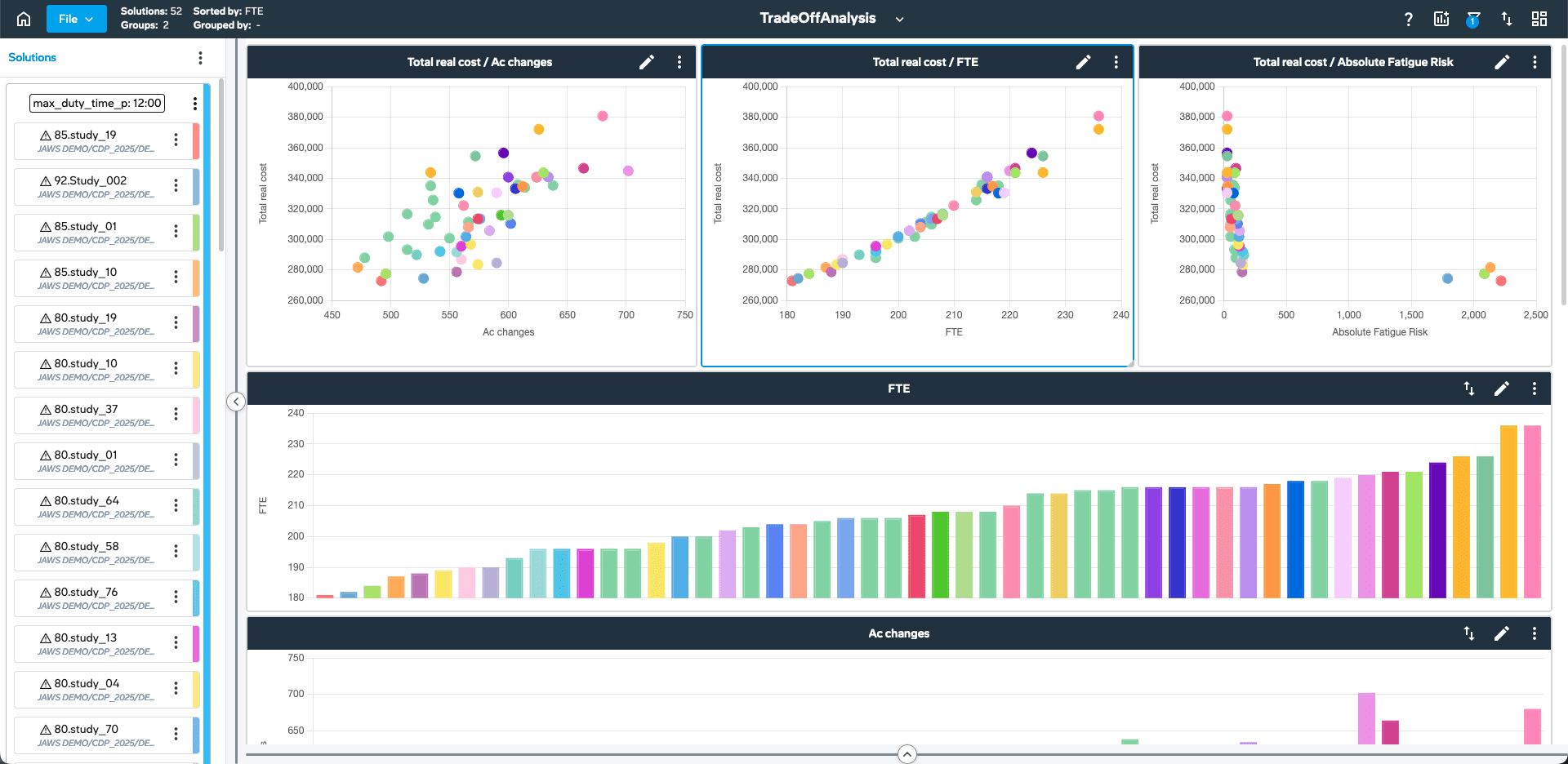
Results return as a ranked list of scenario configurations, each with its KPI profile visualised against the user's original targets. Planners can filter, compare, and promote any scenario to a full JAWS analysis session. The output is designed for decision-making, not just data review.
Process
This work ran through a series of CAB workshops and an internal innovation sprint. I facilitated a structured design session with planners from two airlines to test the direction-reversal concept before any interface was built. The question was whether the mental model made sense — whether planners could naturally express their work as target ranges rather than parameter choices.
The response was strongly positive. Several planners said it was closer to how they actually think about planning when they're not constrained by the tool. That validation shaped the entire subsequent design.
I produced concept sketches, a high-level interaction flow, and a prioritised roadmap connecting Phase 1 (templates/comparison), Phase 2 (KPI-driven input), and Phase 3 (ML-assisted exploration). The roadmap was aligned with product leadership and used as the basis for capacity planning through 2025.
Estimated Impact
Target Mastery was in late design and early development at the time of the product transition. Based on the validated direction and Phase 1 baselines:
Configuration time for non-expert planners estimated to reduce by a further 40–60% on top of Phase 1 gains
Elimination of the expert-knowledge bottleneck for standard planning cycles
Foundation for AI-assisted scenario generation without requiring users to understand ML concepts
Roadmap aligned and resourced for 2025 delivery
Reflection
The most interesting thing about this project was that the biggest design decision wasn't a UI choice. It was convincing stakeholders that the current interaction model — parameters first — was the wrong frame entirely.
That argument was won with data (NPS patterns, usability session recordings, CAB feedback) and with a simple restatement: planners think in outcomes, not in parameters. The tool should too.
The other thing I'd carry forward: working at the pace of trust, not at the pace of features. The roadmap was deliberately staged — each phase giving users a reason to extend their trust in the system a little further. Skipping a step would have been faster on a Gantt chart and worse for the product.
year
2024–2025
timeframe
2024–2025
tools
Figma, Miro, JIRA, Python (correlation analysis)
category
UI/UX
see also